Simplified interfaces
1. Introduction
Surfaces are used to describe fluxes across the boundary of the construction. They combine boundary conditions, geometric properties, and climate data. There are two main types of surfaces:
-
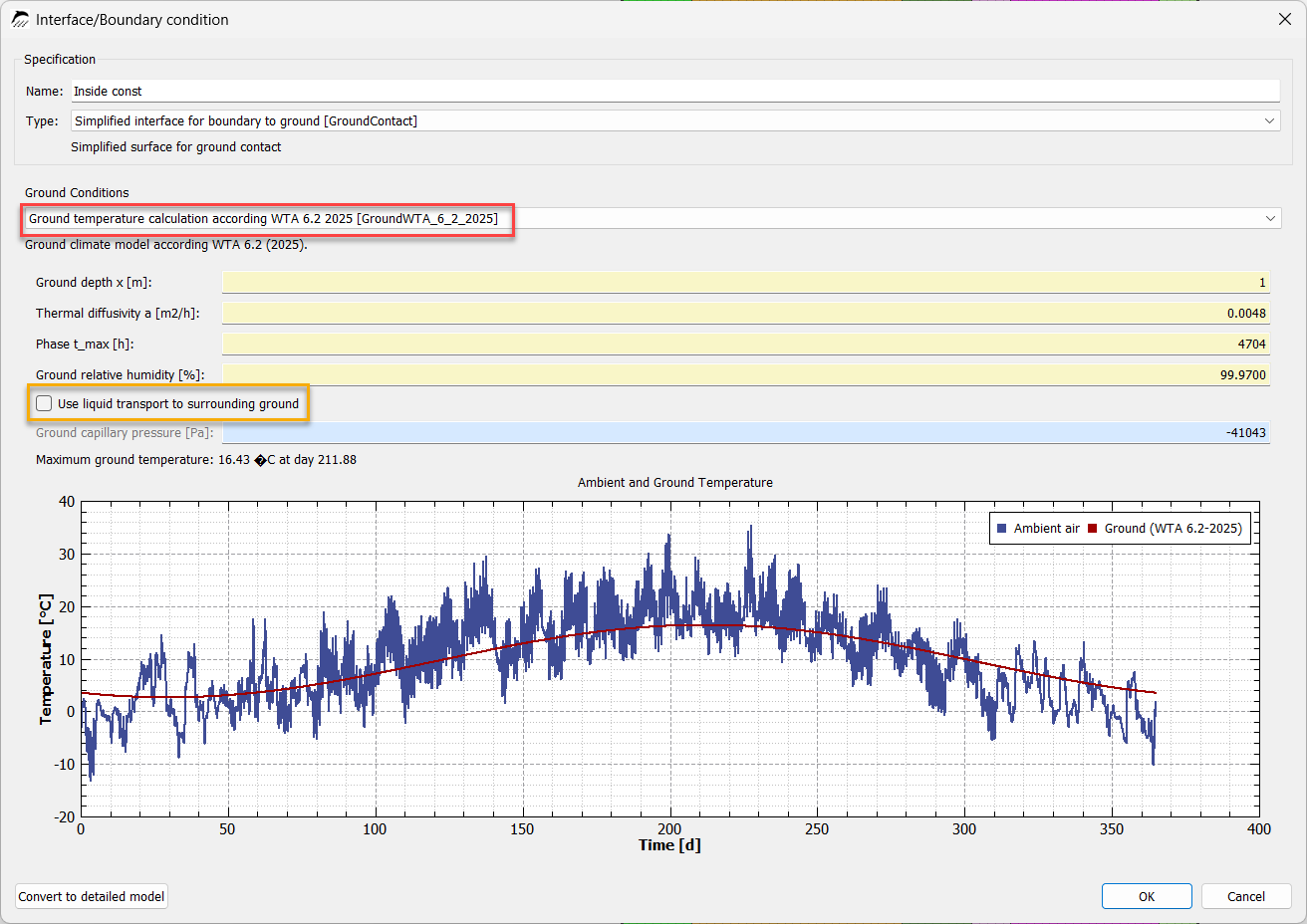
simplified
-
detailed
For simplified surfaces, all properties are defined in a single dialog. This simplifies handling, but limits the range of functions. For detailed surfaces, the surface itself acts as a container for different boundary conditions. The actual configuration is then performed within these boundary conditions. All boundary-condition models available in DELPHIN can be used here. This variant also allows custom climate data to be used in parallel with the location data. The following sections deal only with the simplified model. There are three types:
-
interior boundary
-
exterior boundary
-
ground boundary
2. Surfaces for Indoor Climate
2.1. Introduction
An indoor climate model describes the mathematical and physical behavior of the climate within a room or an entire building. It is used to simulate the thermal and hygrothermal behavior of the indoor air and the surrounding building components. The respective model is strongly influenced by the use of the room, the associated expected relative humidity levels in the room, and the installed building services systems. Indoor climate models vary depending on the location and the applicable standards and guidelines.
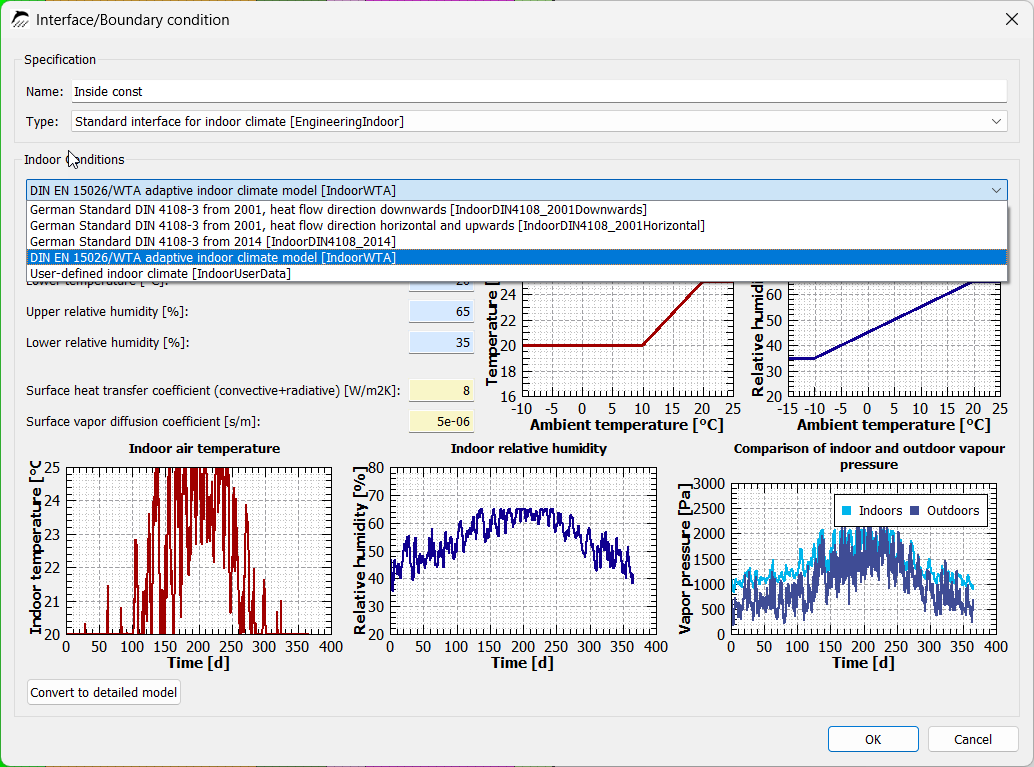
Previous DELPHIN versions distinguished between the following indoor climate models:
-
DIN 4108-3 (2001): downward heat flow
-
DIN 4108-3 (2001): horizontal and upward heat flow
-
DIN 4108-3 (2014)
-
DIN EN 15026 / WTA 6.2: adaptive indoor climate
The latter is additionally divided into further subcategories that differ with regard to the respective moisture load class:
-
indoor climate model for low internal moisture loads
-
indoor climate model for normal internal moisture loads
-
indoor climate model for increased internal moisture loads (+5%)
-
indoor climate model for high internal moisture loads
In DELPHIN, these settings were entered using the following dialog:
DELPHIN version 6.1.8 additionally introduces the indoor climate models according to ASHRAE 160, the current indoor climate model from WTA Guideline 6.2 (2025), and a user-defined indoor climate.
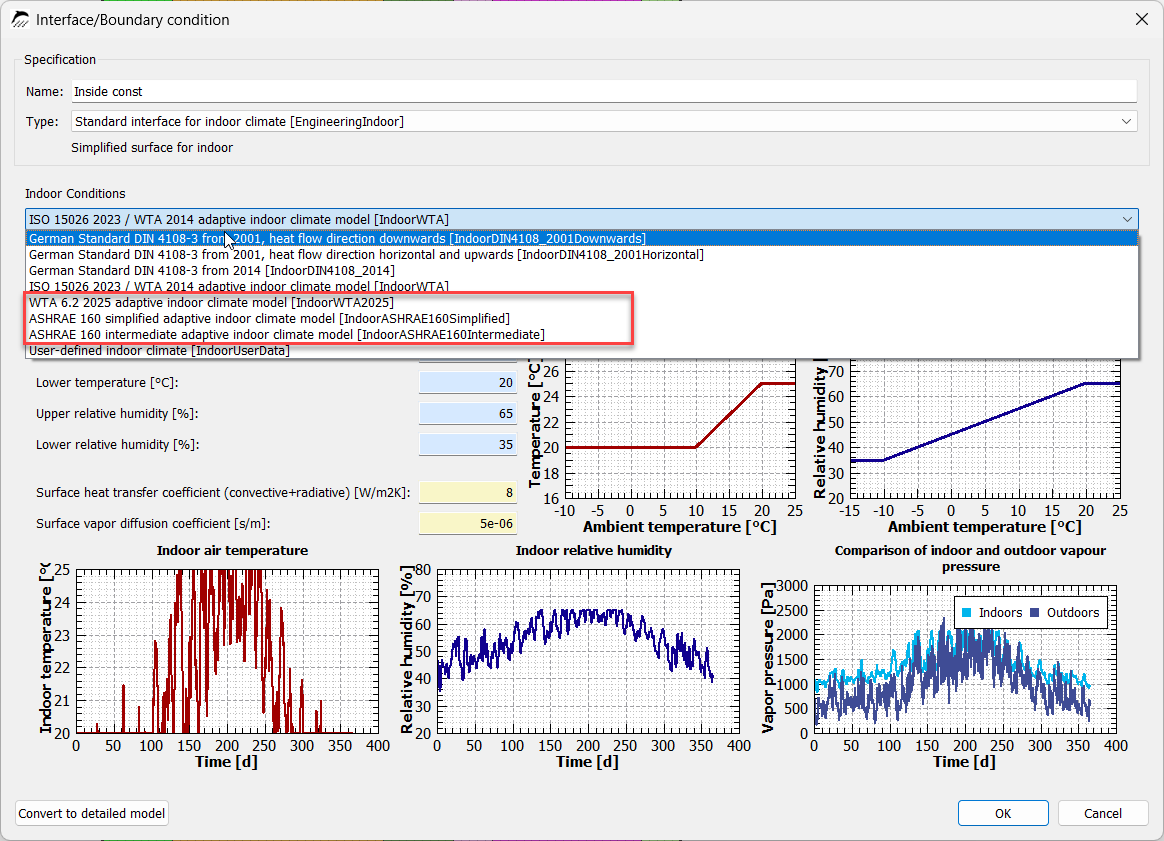
The individual indoor climate models are described in more detail below.
2.2. Indoor Climate Model According to DIN 4108-3 (2001), Downward Heat Flow
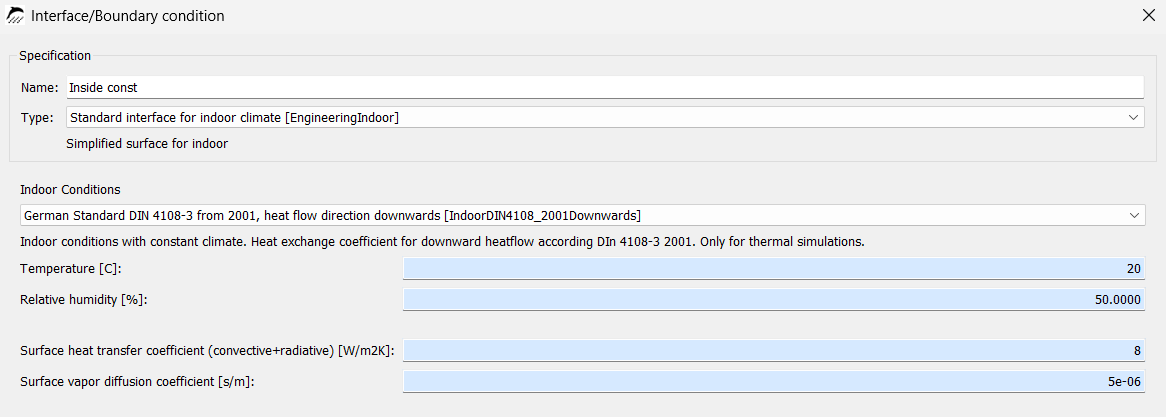
The indoor climate according to DIN 4108-3 from 2001 for downward heat flow is used, for example, to calculate a floor slab with a heated room above and an unheated room below. The heat flow therefore passes downward through the component. It should be noted that this indoor climate model no longer represents the current state of the art. The specified indoor climate considers only constant climate conditions and should be used only for purely thermal simulations. The parameters shown in blue cannot be modified for the standard indoor climate.
2.3. Indoor Climate Model According to DIN 4108-3 (2001), Horizontal and Upward Heat Flow
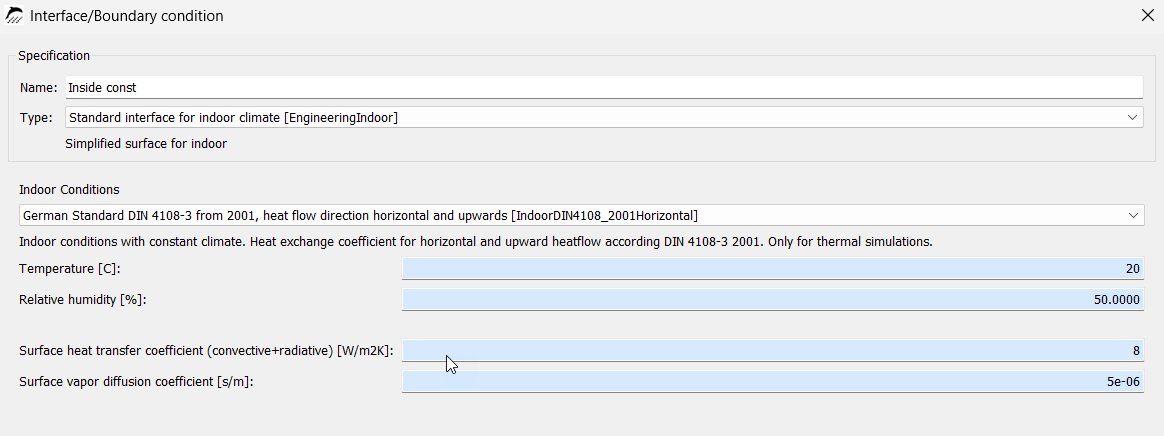
This indoor climate should likewise be used only for purely thermal simulations. An upward heat flow occurs, for example, in a floor slab with a heated room below and an unheated room above. Corresponding heat-flow directions can also occur at the junction between a floor slab and an exterior wall. Here too, it should be noted that the indoor climate model no longer represents the current state of the art and that the parameters of the standard indoor climate cannot be modified.
2.4. Indoor Climate Model According to DIN 4108-3 (2014)
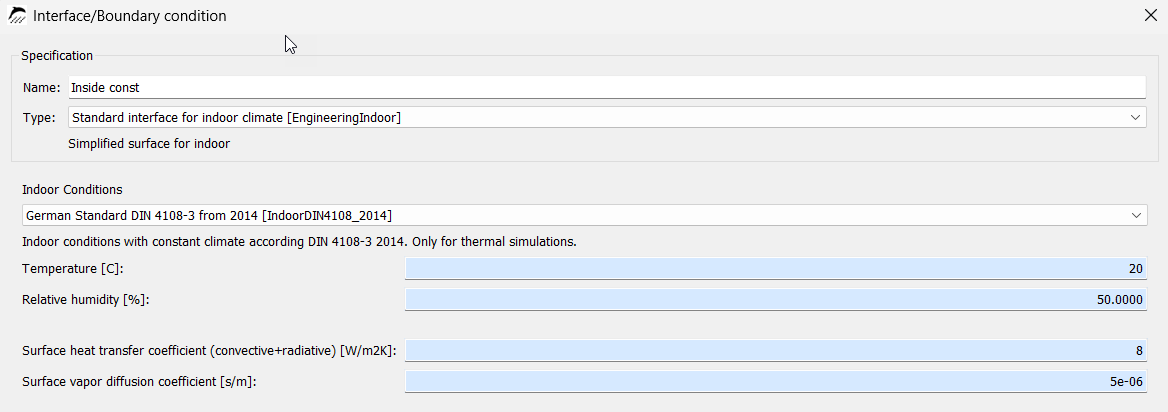
The indoor climate according to DIN 4108-3 from 2014 does not differ in its calculation from the indoor climate according to DIN 4108-3 from 2004. In DELPHIN, no distinction is made here between downward and horizontal/upward heat flow.
2.5. Indoor Climate Model According to ISO 15026 / WTA 2014
WTA Guideline 6.2 from 2014 uses an indoor climate that is calculated solely from the outdoor air temperature. The outdoor relative humidity is not included in the calculation. The current versions of DIN 4108-3:2024 and ISO 15026 refer to this indoor climate model.
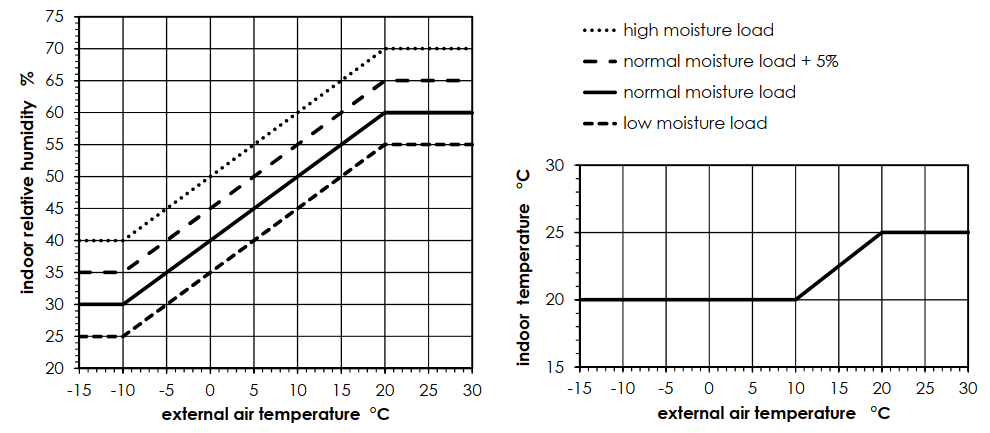
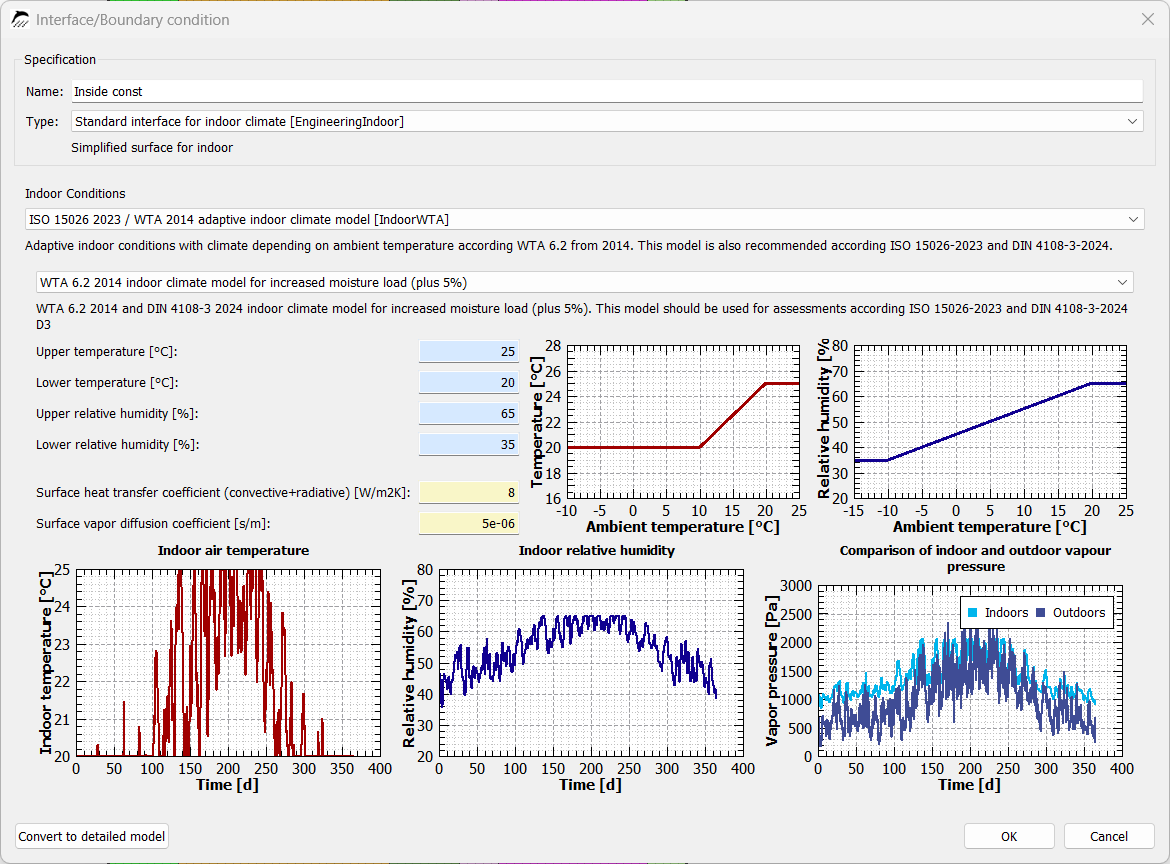
The indoor climate model distinguishes between four different indoor moisture loads, which must be selected according to the expected moisture load (see Indoor Climate Model According to WTA 6.2 - 2025). For outdoor temperatures below 10 °C, the indoor temperature is 20 °C; for outdoor air temperatures above 20 °C, it is 25 °C. Between outdoor air temperatures of 10 °C and 20 °C, the indoor air temperature is linearly interpolated. The indoor air humidity is likewise calculated from the outdoor air temperature.
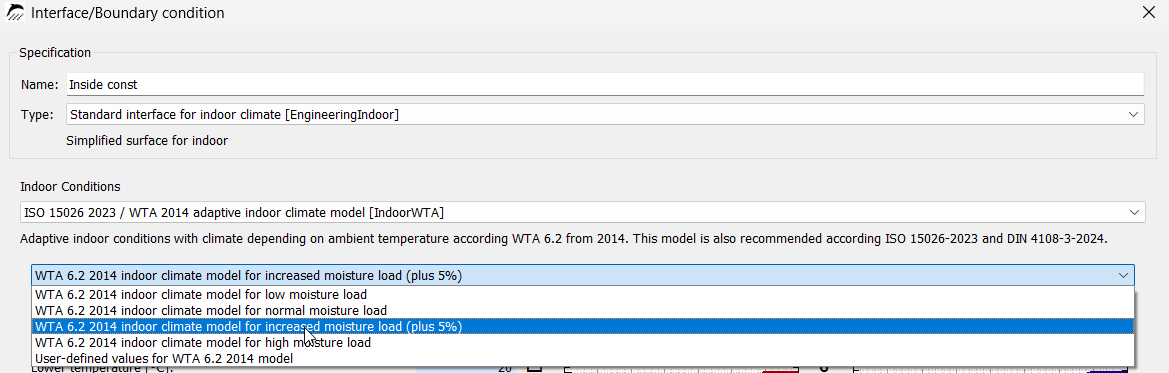
The moisture load can be selected in the menu shown above.
2.6. Indoor Climate Model According to WTA 6.2 - 2025
WTA Guideline 6.2 distinguishes between four different indoor climates, which differ in terms of the expected indoor air humidity or moisture load.
According to WTA 6.2:2025, A.4, the indoor climates for the respective moisture loads can be applied to the following examples:
Low moisture load:
-
Residential rooms with a ventilation system (sufficient basic air exchange provided by a ventilation system), without moisture recovery/humidification, and with normal moisture loads from occupants and plants
-
Sports halls without sanitary facilities (with mechanical basic ventilation and low occupancy)
-
Sales areas and storage rooms with low occupancy
However, this approach does not include a safety margin and may therefore restrict future changes of use.
Normal moisture load:
-
Residential rooms with normal occupancy and typical periods of presence
-
Offices, kindergartens, and schools without information on occupancy and/or ventilation
-
Sports halls with sanitary facilities
Increased moisture load (+5%):
The "increased moisture load" represents the "normal moisture load" with an additional safety margin. For this purpose, the expected moisture load is increased by 5 %.
-
Rooms designed for the critical case with regard to moisture load
-
Commercial kitchens
-
Residential rooms without information on ventilation and occupancy
High moisture load:
The "high moisture load" case applies to rooms with very high regular occupancy (less than 15 m² per person) and other indications of high indoor air humidity.
Further examples can be found in Annex A.4 of the 2025 WTA Guideline.
This classification does not differ from the previous indoor climate model according to WTA 6.2:2014. One difference is the specified indoor temperature for corresponding outdoor temperatures of up to 10 °C. Instead of an indoor air temperature of 20 °C, the new model specifies an indoor temperature of 21 °C.
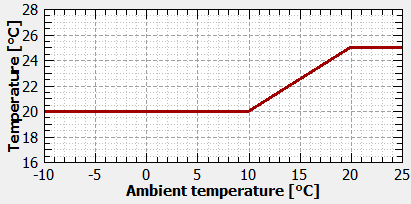
Figure 9. Indoor temperature WTA 6.2 2014
|
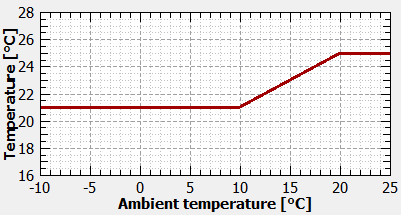
Figure 10. Indoor temperature WTA 6.2 2025
|
Another difference concerns the determination of indoor air humidity. Whereas WTA Guideline 6.2:2014 uses relative indoor air humidity as a function of outdoor air temperature, WTA 6.2:2025 determines indoor air humidity from the moisture load in g/m³ as a function of outdoor temperature.
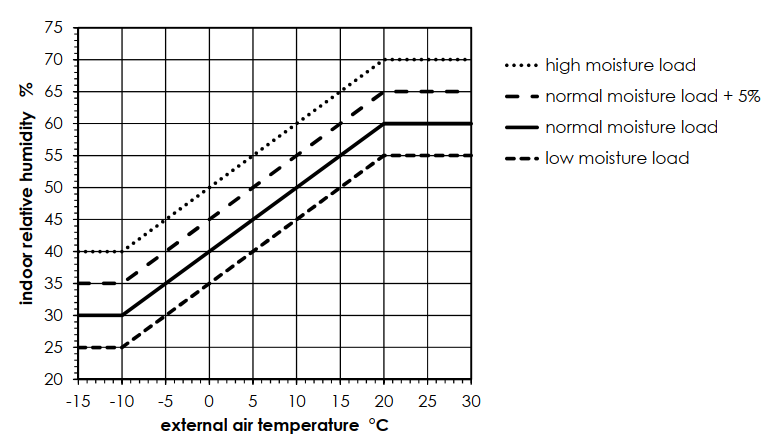
Figure 11. Relative humidity WTA 6.2 2014
|
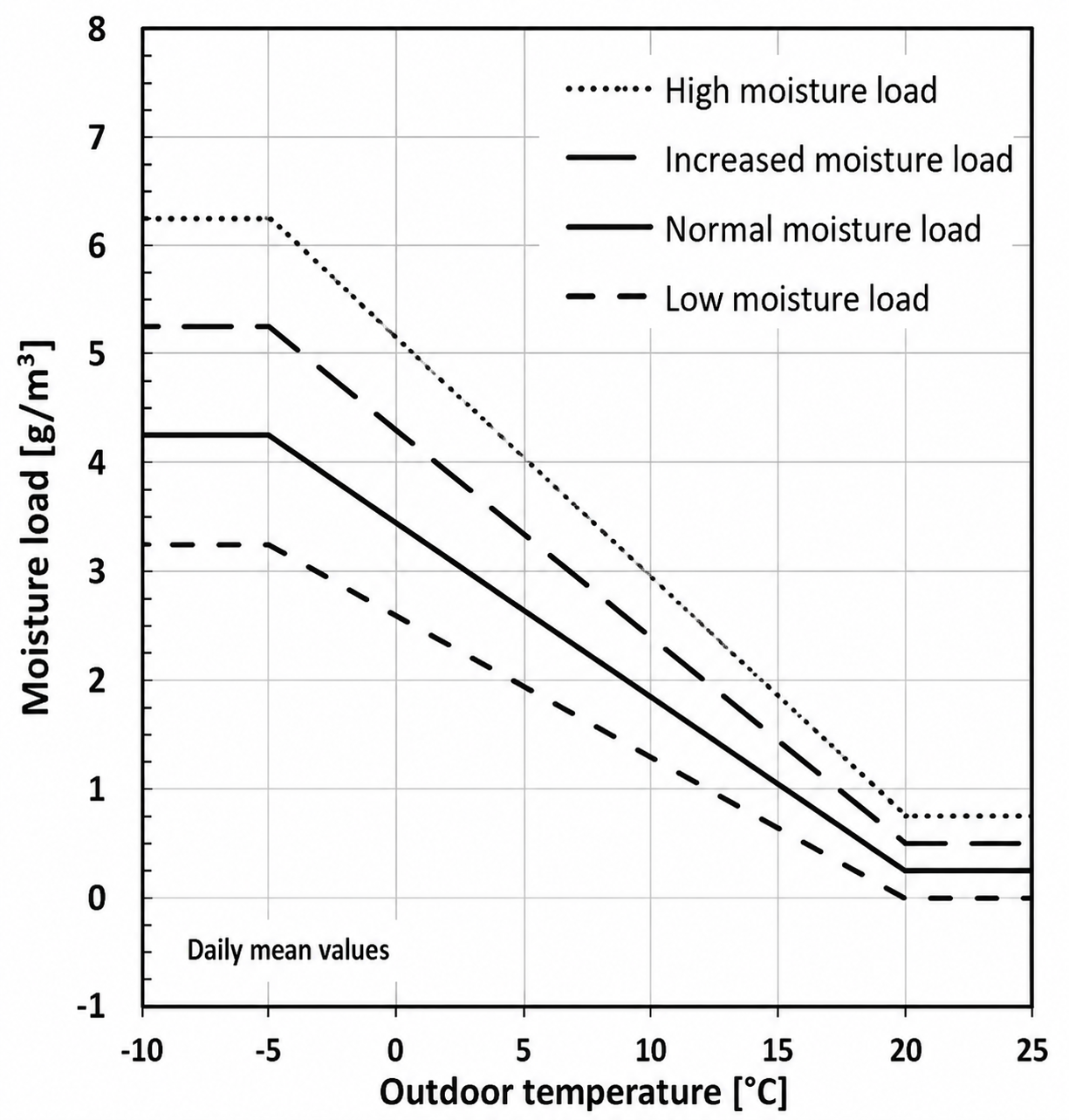
Figure 12. Moisture load WTA 6.2 2025
|
The model according to WTA 6.2:2014 may nevertheless continue to be used. In addition, the indoor climate can be defined using setpoints specified and maintained by HVAC systems.
2.6.1. Input in DELPHIN
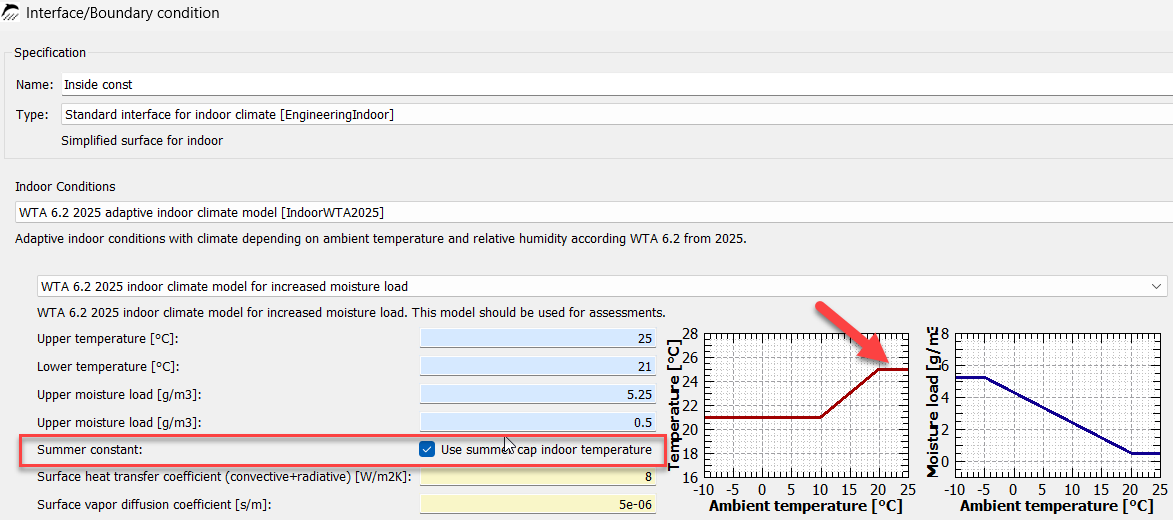
First, the appropriate moisture class must be selected in the dialog. The fields shown in blue are fixed and cannot be changed for the standard indoor climate. Fields highlighted in yellow, in this case the heat transfer coefficient and the vapor diffusion transfer coefficient, can be adjusted. However, they contain the standard values by default and therefore do not normally need to be changed.
If the blue checkbox in the dialog is selected, the indoor temperature is limited to 25°C in summer. If the blue checkbox is not selected, the indoor temperature increases linearly in summer. This represents a room without cooling.
2.7. Indoor Climate According to ASHRAE 160
ASHRAE 160 distinguishes between three different indoor climate models. The indoor temperature is determined by building codes, laws, or regulations. Alternatively, the indoor temperatures are determined from the moving 24-hour average according to the following table:
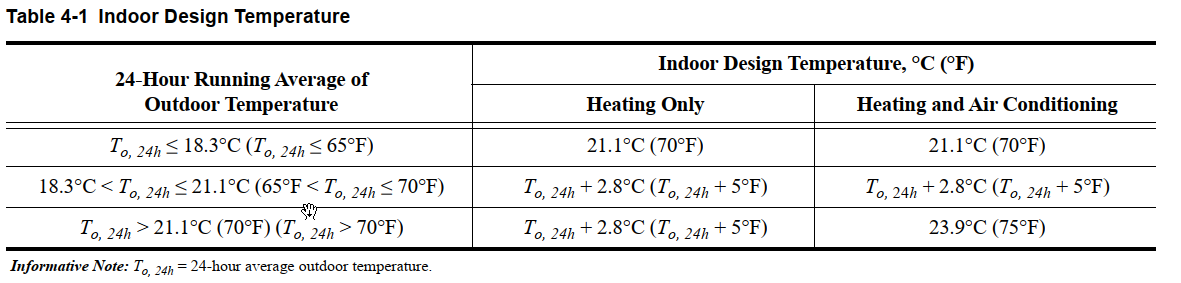
For indoor air humidity, either the intended design indoor humidity of the HVAC equipment can be used or one of the following three models can be applied:
-
Simplified Model
-
Intermediate Model
-
fully parameterized calculation
The latter cannot yet be represented in DELPHIN 6.1.8.
2.7.1. Simplified Model in DELPHIN
The Simplified Model calculates the relative humidity in the rooms from the daily average outdoor temperature. In the dialog, a blue checkbox can be used to indicate the presence of heating and air conditioning. The indoor temperatures are then limited in summer, or from an outdoor temperature of 21 °C onward, to a maximum temperature of 23.8 °C. If this checkbox is not selected, it is assumed that the building has no air-conditioning system, resulting in significantly higher indoor temperatures.
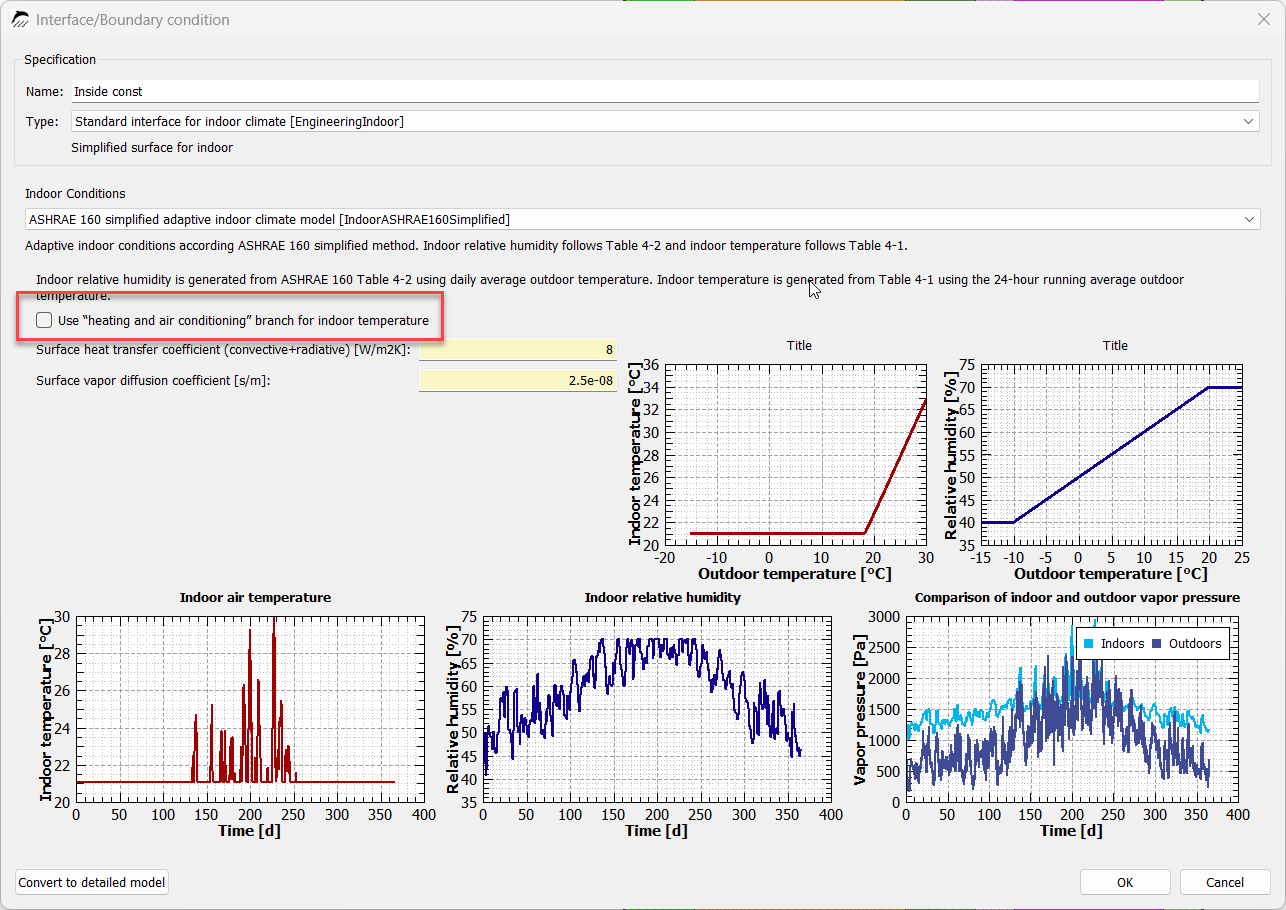
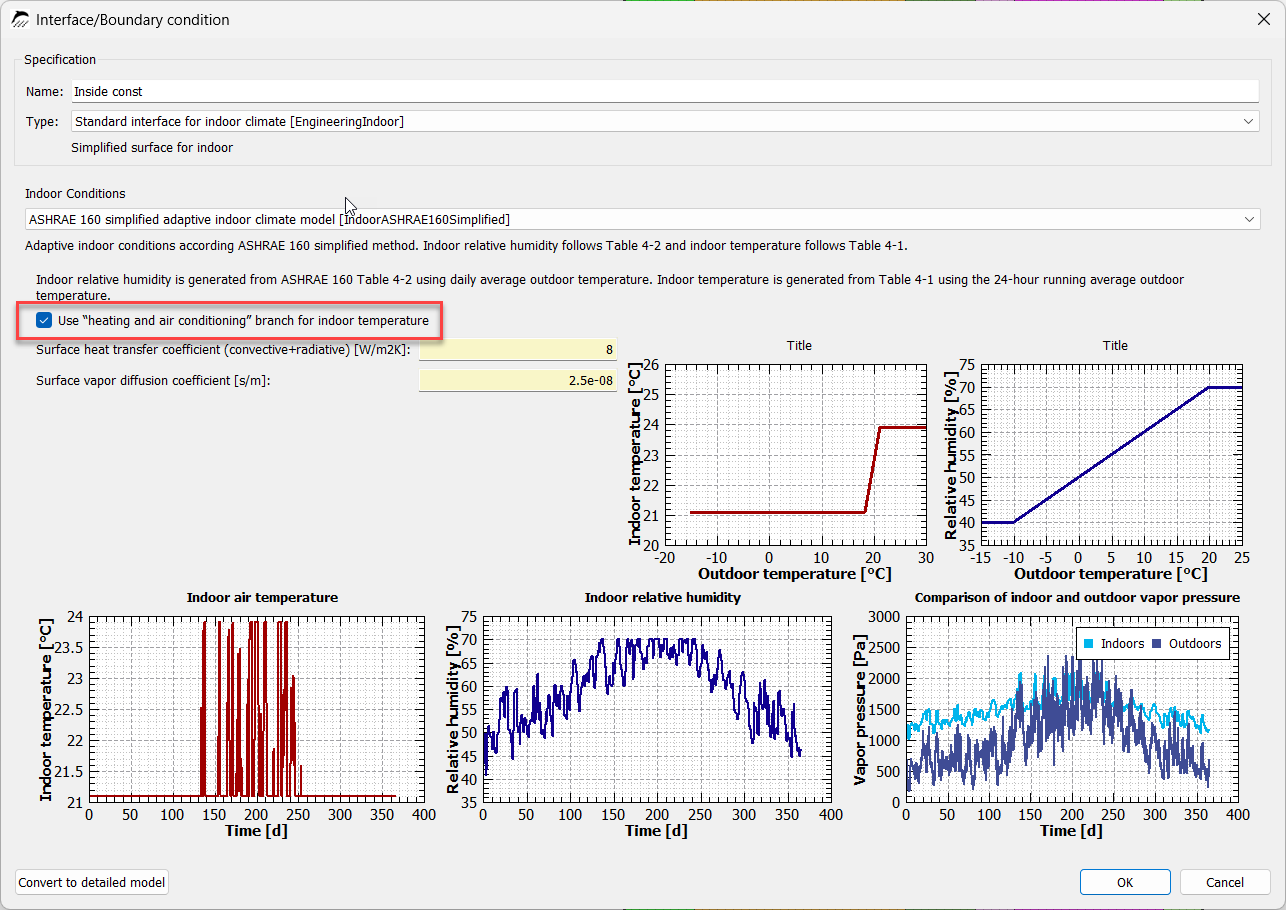
The fields highlighted in yellow can also be changed in this dialog; however, their default values correspond to the standard values.
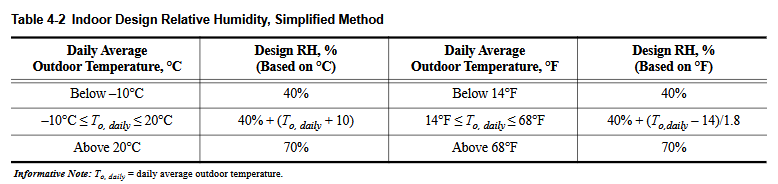
The relative-humidity diagram shows that a relative humidity of > 70% is not exceeded. This corresponds to the recommendation in ASHRAE 160, which states that measures should be taken to counteract relative humidity outside this limit. Further requirements concerning indoor air humidity can be found in the applicable ASHRAE 55 standard.
The relative humidity for the indoor space is based on Table 4-2 of ASHRAE 160:
2.7.2. Intermediate Model in DELPHIN
In contrast to the Simplified Model, the Intermediate Model uses hourly weather data and more detailed information on room cooling to determine indoor air humidity. The corresponding DELPHIN dialog therefore contains more detailed inputs.
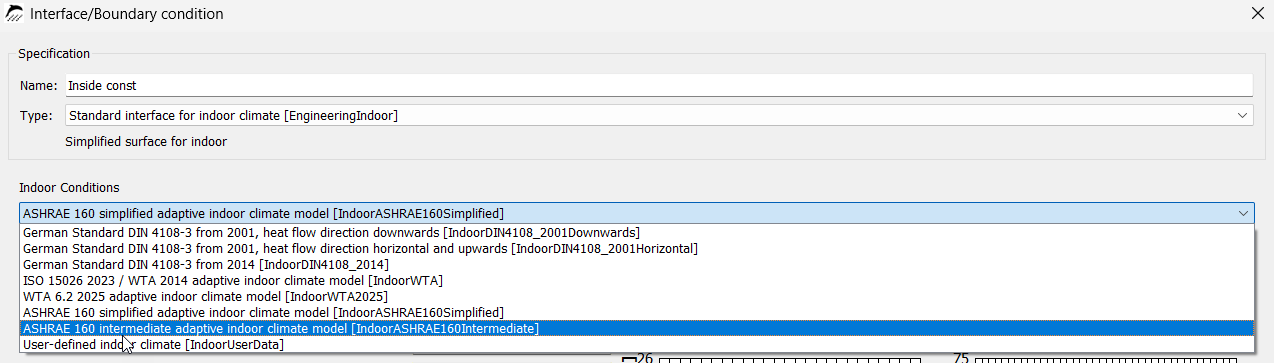
The generally applicable settings are explained first.
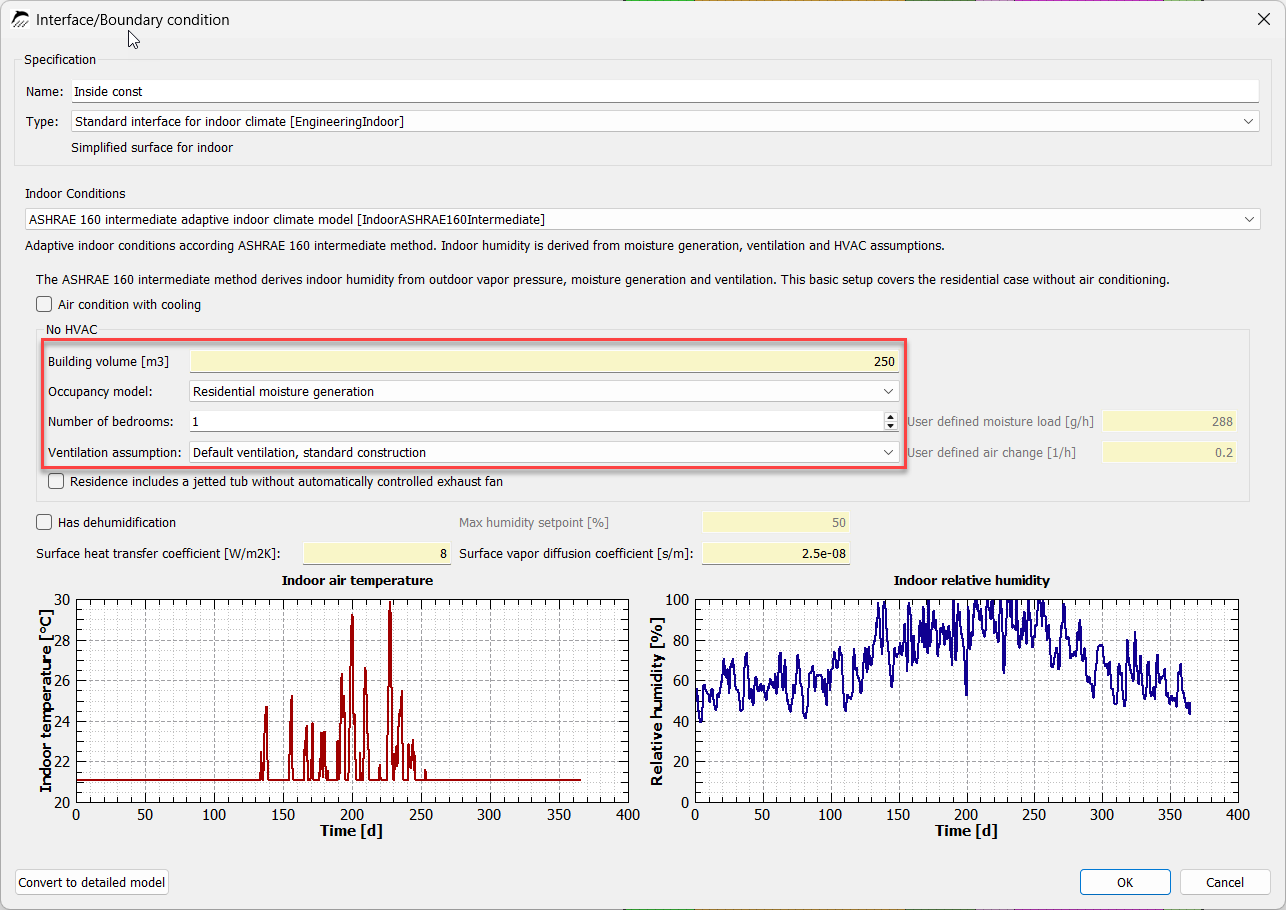
In the first row highlighted in yellow, the building volume in m³ must be specified. Among other things, this is relevant for determining ventilation in the building. The row below specifies whether the moisture loads are to be determined for a residential building or whether a user-defined moisture load in g/h is to be specified.
Here, the moisture load depends on the number of planned bedrooms in the building, which correlates with the number of occupants in the building. For a building with one bedroom, two occupants are assumed. Each additional bedroom adds one additional occupant. This means that three occupants are assumed for two bedrooms, four occupants for three bedrooms, and so on.
In the next step, the ventilation settings are selected. A distinction can be made between standard ventilation and user-defined ventilation. Standard ventilation distinguishes between a standard building with an air change rate of 0.2 1/h and an airtight building with an air change rate of 0.1 1/h. If a different air change rate is required, it can be entered manually as user-defined ventilation.

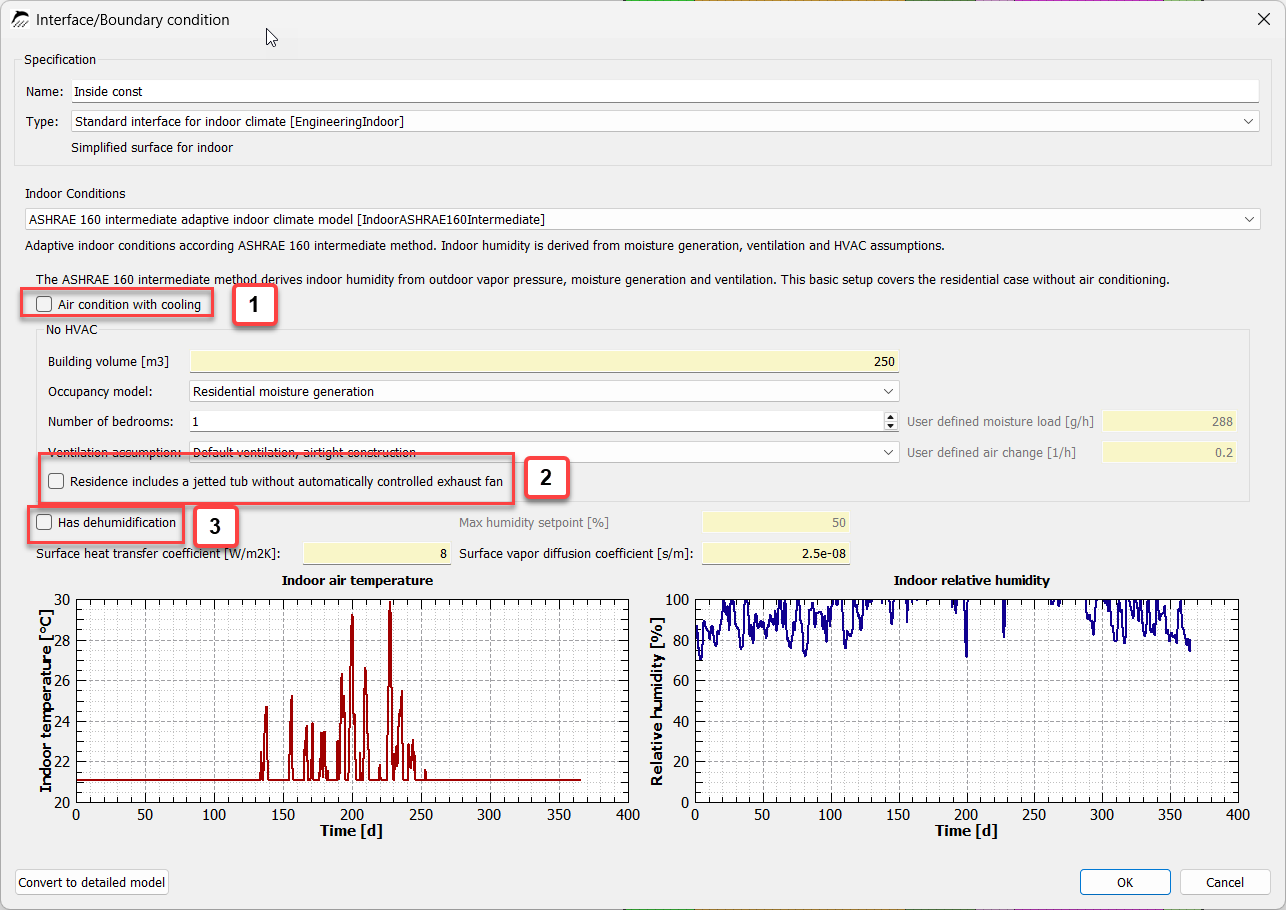
[1] Air-conditioning system with cooling:
As indicated by the description, selecting this checkbox is intended for rooms with a cooling air-conditioning system. This is described in Section 4.3.2.2 of ASHRAE 160. This setting limits the maximum indoor temperature to 23.8 °C. It also reduces the relative humidity in the room. If this blue checkbox is selected, it is no longer possible to add the presence of a hot tub without an automatically controlled exhaust fan.
[2] Presence of a hot tub without an automatically controlled exhaust fan
If the room contains a hot tub without automatic exhaust control, higher moisture loads must be expected. According to ASHRAE 160, the expected moisture load increases by 1.3 L/day.
[3] The room has a dehumidification function
If the room has a dehumidifier, the expected relative humidity is limited to a maximum of 50 %.
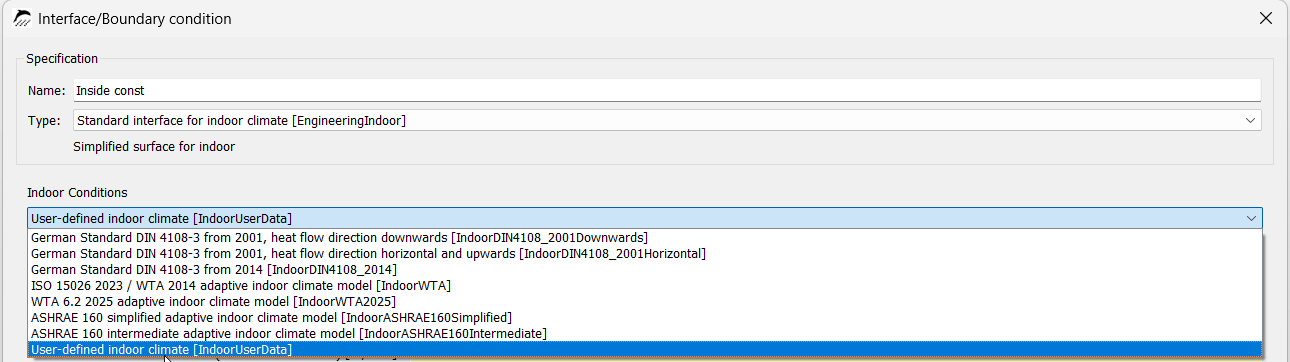
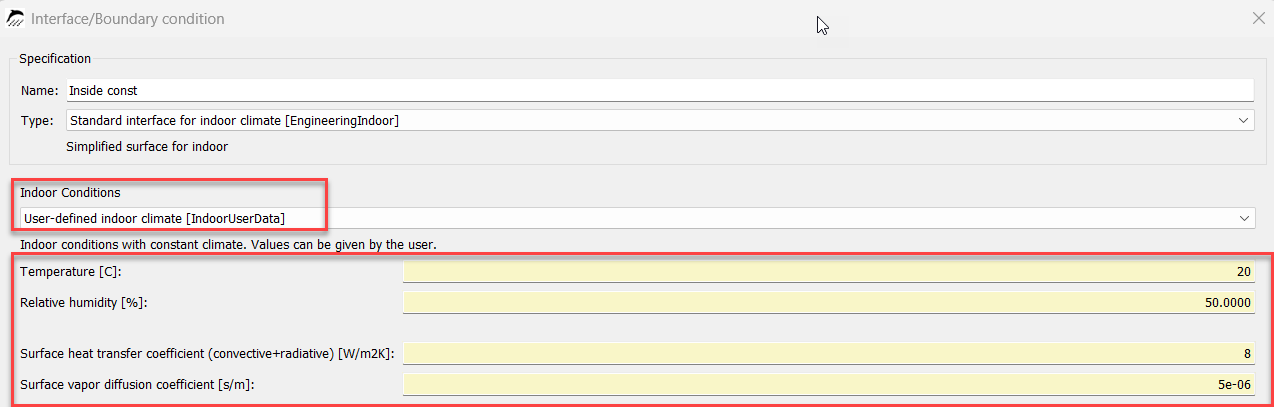
2.8. User-Defined Indoor Climate
The user-defined indoor climate makes it possible to specify manual values for the indoor climate. These values remain constant over the simulation period and represent only the values entered.
3. Outdoor Climate Conditions
3.1. Location-Based Outdoor Climate (DIN EN ISO 15927)
In addition to the constant outdoor climate, DELPHIN provides two further outdoor climate conditions. The standard outdoor climate initially uses the local climate corresponding to the selected location.
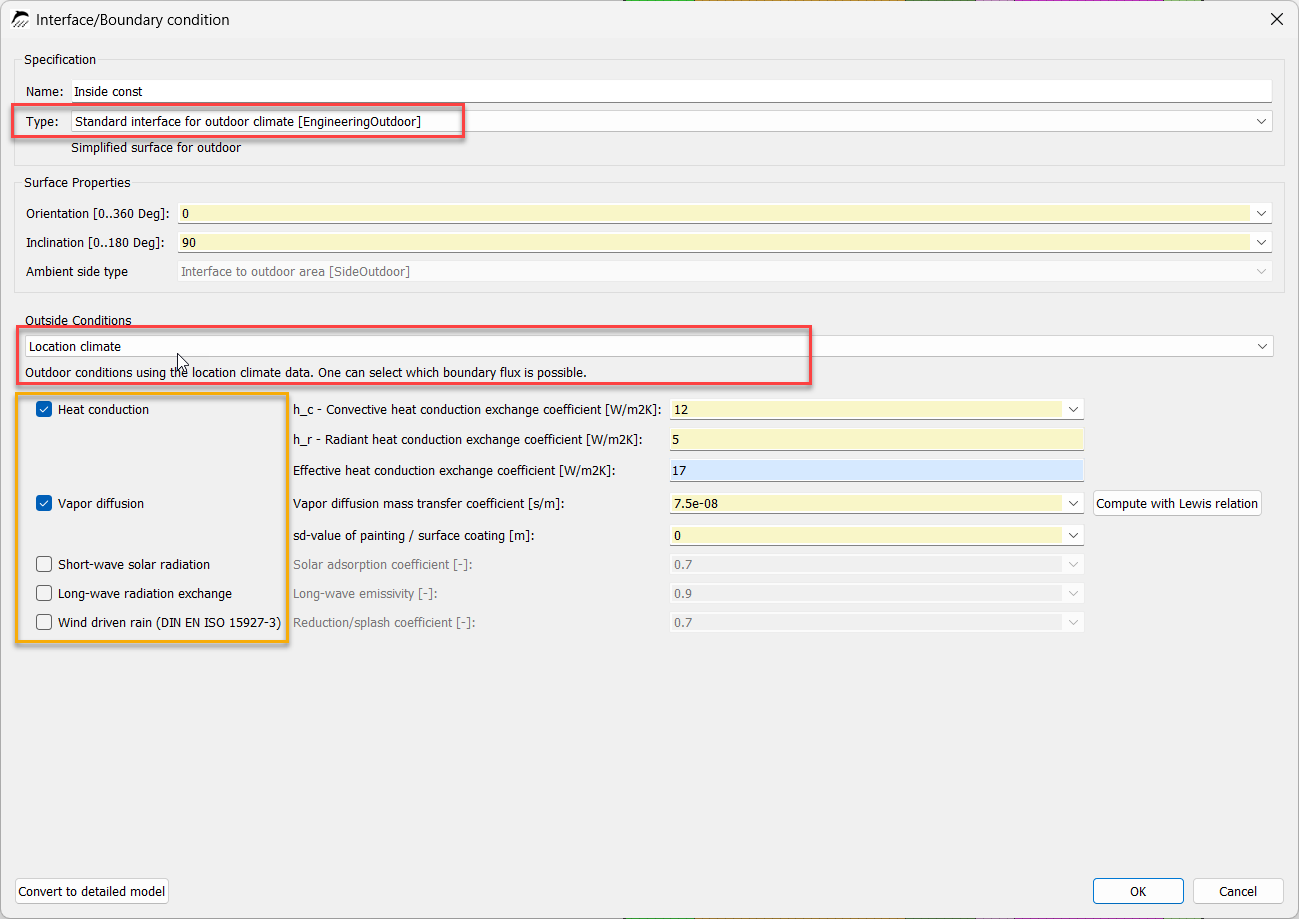
Heat transfer, vapor diffusion, short-wave solar radiation, long-wave radiation exchange, and driving rain can be taken into account here. The settings depend on how the component is exposed to weather conditions.
Heat transfer
Heat transfer always occurs here when there is a temperature difference between the boundaries. If the surface is exposed to strong wind, the value can be increased to 20 W/m2K in accordance with EN ISO 6946. The effective heat transfer coefficient consists of the convective component and the radiative component of the heat transfer coefficient.

Vapor diffusion
Vapor diffusion should always be enabled for hygrothermal assessments.

Short-wave solar radiation
Short-wave solar radiation applies to all surfaces exposed to solar radiation. This includes both direct and diffuse solar radiation. The lighter and more reflective the surface, the lower the absorption coefficient.

Long-wave radiation exchange
Long-wave radiation exchange is particularly important for roofs. A high emissivity indicates that the surface can emit a large amount of energy in the form of heat. This is the case, for example, for very dark surfaces. Highly reflective surfaces have a very low emissivity, which means that the surface emits only a small proportion of heat and can retain a larger proportion. This effect is relevant, for example, to nighttime cooling and the associated risk of condensation.

Driving rain
Driving rain is relevant for all weather-exposed facades and roofs that do not have structural or material protection against driving rain. If, for example, an exterior wall is located beneath a sufficiently large roof overhang, driving rain can be omitted. If the roof to be calculated is assumed to have a completely intact waterproofing layer, driving rain can likewise be omitted. However, because this is very difficult to verify, driving rain should nevertheless be enabled for hygrothermal assessments. For vertical walls, the value can be reduced by 30 %.
Driving rain is calculated here in accordance with DIN EN ISO 15927-3.

3.2. Outdoor Climate (ASHRAE 160)
The second outdoor climate differs from the previous location climate only in terms of driving rain, which is calculated here according to ASHRAE 160.
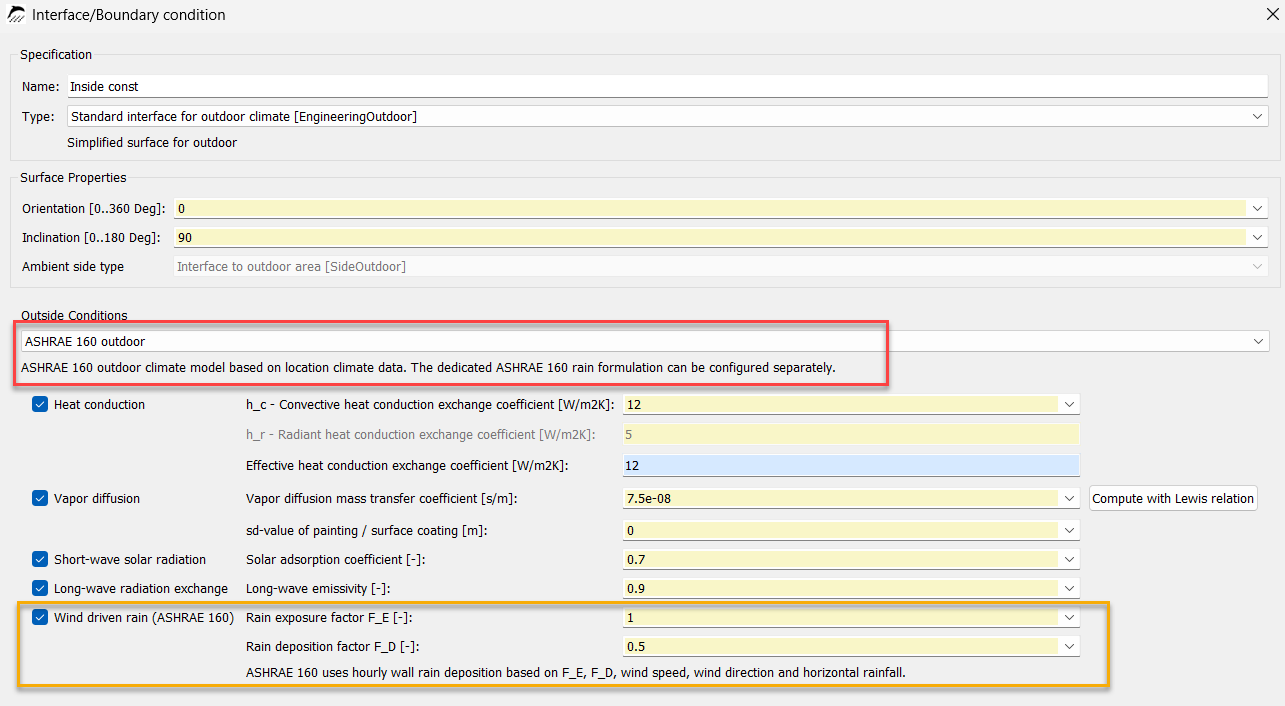
Driving rain
Driving rain is calculated using the rain exposure factor FE and the rain deposition factor FD. The factor FE describes the severity of exposure, which depends, among other things, on the building height and the exposure of the component.

The coefficient FD refers to the position of the simulated area relative to the entire object. Beneath a pitched roof, for example, the coefficient is FD = 0.35 because the wall is aerodynamically well protected by the roof. If a wall is exposed to completely unobstructed rain runoff, FD is 1.0.

4. Climate Conditions for Ground-Contact Components
Different outdoor climate conditions apply to components in contact with the ground.

Four different models are distinguished here, some of which refer to different standards:
-
Ground temperature calculation according to DIN 4108 Supplement 2 for depths > 1 m
-
Ground contact according to DIN 4108-3 D.2.4 for depths < 1 m
-
Ground contact according to DIN 4108-3 D.2.4 for depths > 1 m
-
Ground temperature according to WTA 6.2:2025
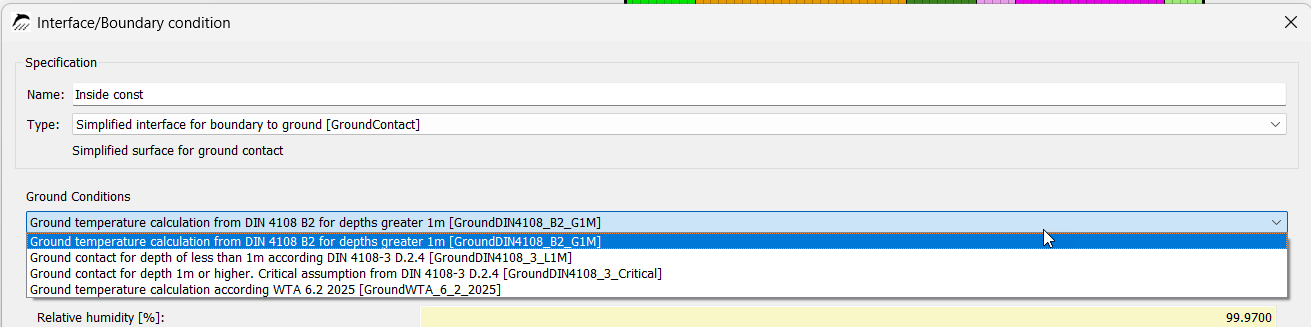
4.1. Ground Temperature Calculation According to DIN 4108 Supplement 2 for Depths > 1 m
The properties shown in blue cannot be adjusted here. In the default setting, the relative humidity is 99.97%, which describes average Central European soil at depths of approximately 1 m or more and represents a conservative assumption.
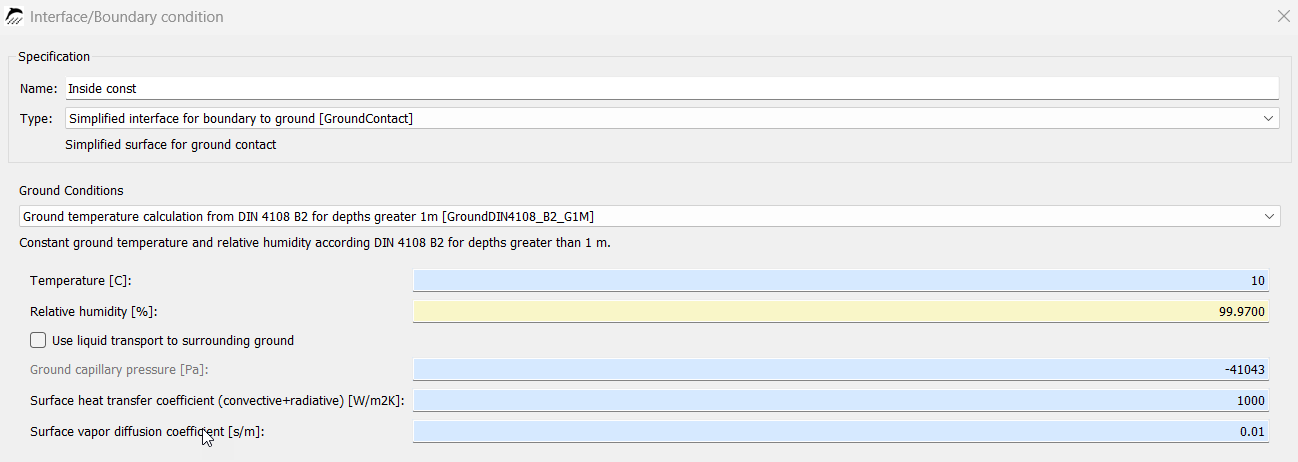
Liquid water transport can additionally be enabled. This should be considered if the component is below the groundwater table and exposed to hydrostatic water pressure.
However, this model is mainly used for purely thermal calculations.
4.2. Ground Contact According to DIN 4108-3 D.2.4 for Depths < 1 m
Compared with the previous model, the DIN 4108-3 model for components located less than 1 m below ground considers very similar properties. Because the component is less than 1 m below ground, the outdoor air temperatures are assumed as the ground temperatures; these depend on the respective location. Liquid water transport is enabled under the same conditions as in the previous model.
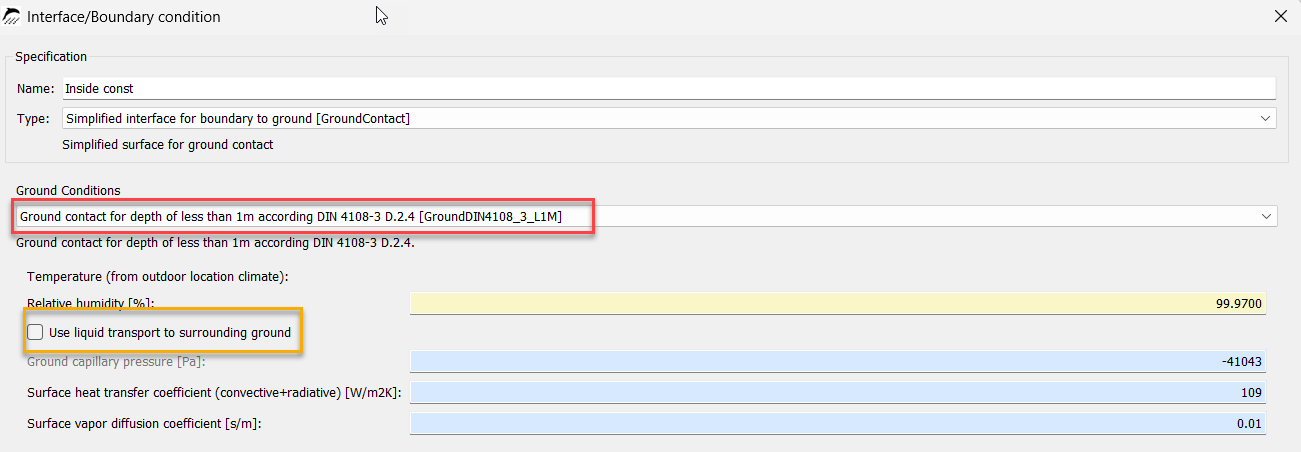
4.3. Ground Contact According to DIN 4108-3 D.2.4 for Depths > 1 m
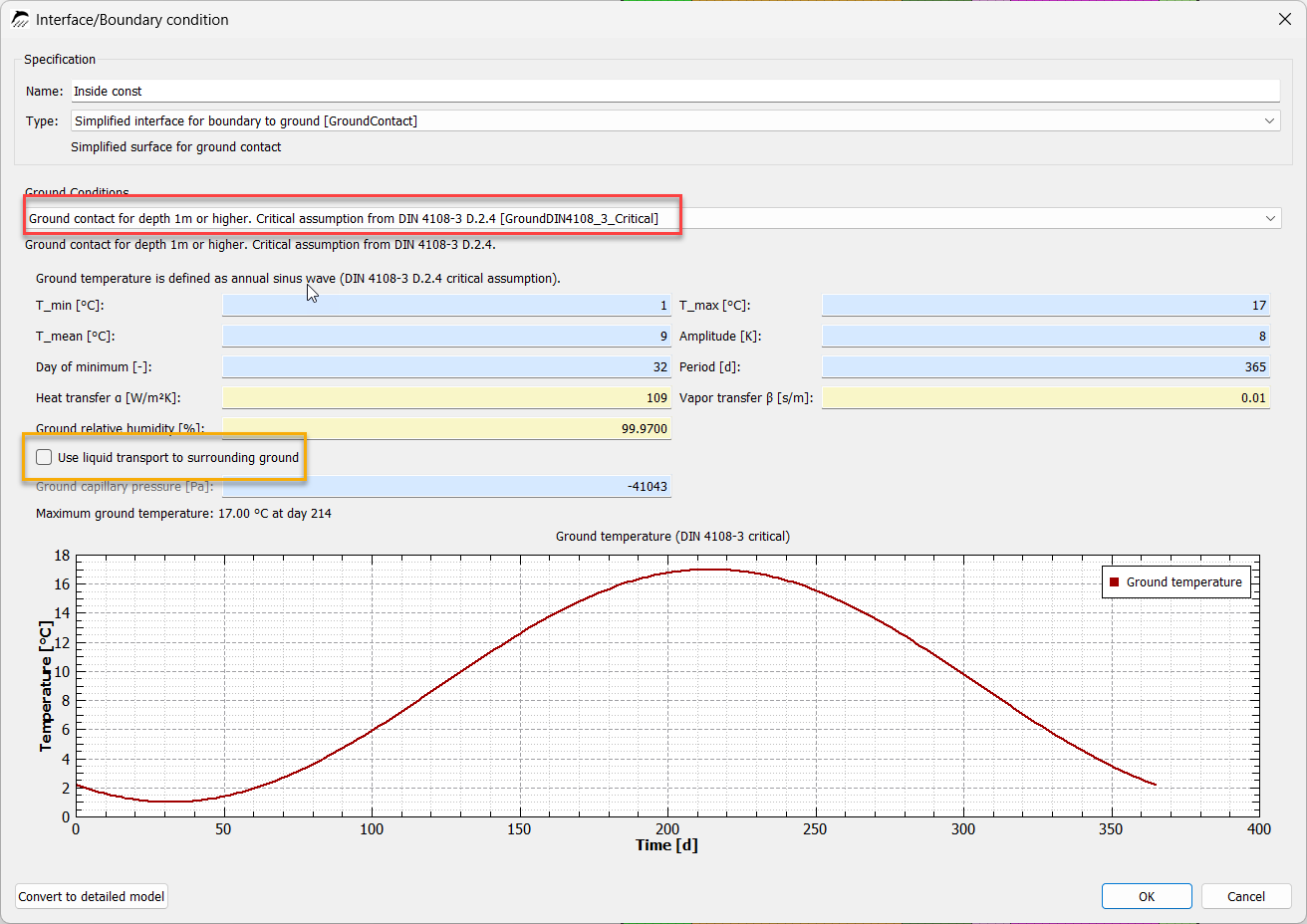
For components located more than 1 m below ground, the following model according to DIN 4108-3 is applied. The temperature profile is simplified as a sinusoidal annual variation with a minimum temperature of 1 °C and a maximum temperature of 17 °C. Here too, liquid water transport can be enabled for components located below the groundwater table.
4.4. Ground Temperature According to WTA 6.2:2025
The ground temperature is calculated from the outdoor climate and the depth at which the component is located in the ground. The closer the component is to ground level, the more pronounced the sinusoidal temperature variation. At depths of approximately 20 m and greater, an almost constant temperature is assumed. If no more precise information is available, the thermal diffusivity is assumed to be 0.0048 m²/h. By default, the phase shift is determined from the period between January 1 and the maximum value, which, if no more precise information is available, is assumed to occur on July 15. Here too, liquid water transport can be enabled under the conditions described above.